Tools Needed
Access to #compliance Slack channel, Flask, OneHub
The Request
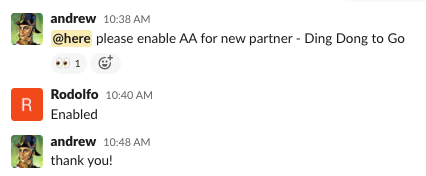
Andrew Patterson will make the request in the slack channel, #compliance for a specific partner.
Casework
These cases are handled by Rodolfo or Jimena.
Step 1: Enable Adverse Action in Flask
- In Flask, navigate to Adverse Action > Partner Adverse Action Details
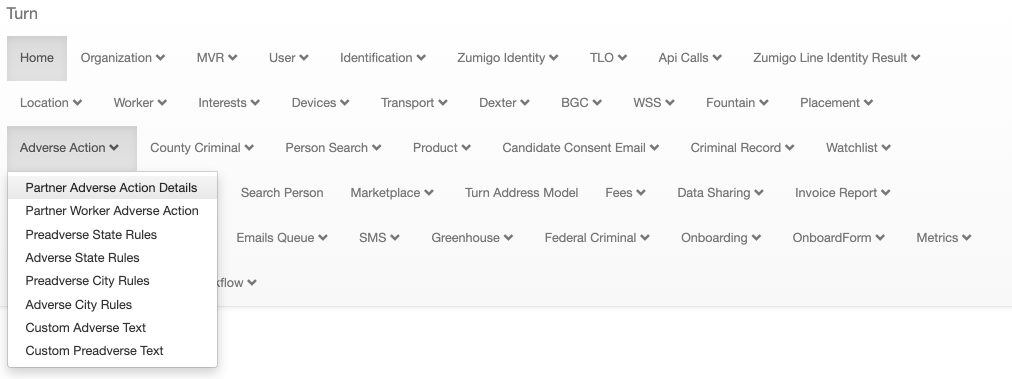
- Click CREATE
- Select the Partner from the list (type to search)
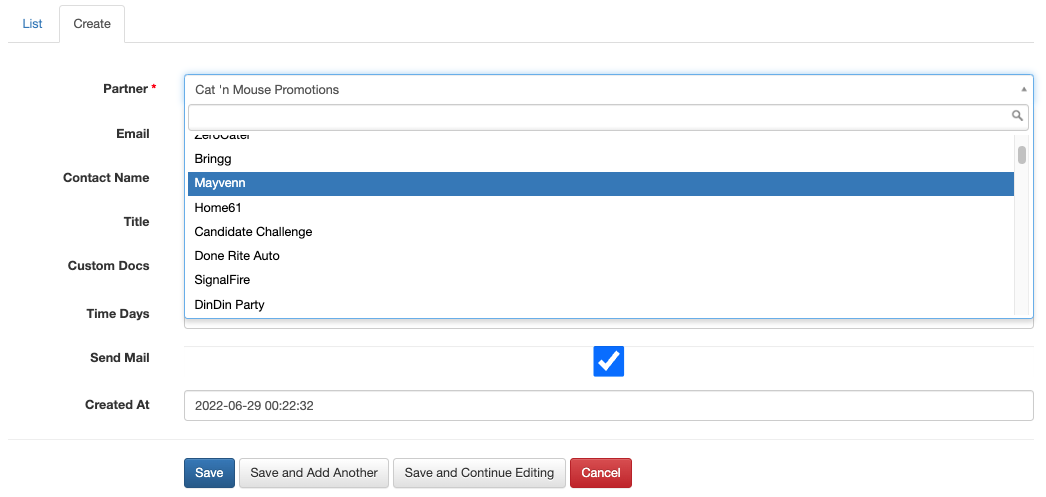
- Enter the Email, Contact Name, and Title ( Due Diligence form, found in OneHub)
- Click SAVE
Step 2: Confirm that the Adverse Action was enabled successfully
- Navigate to Adverse Action > Partner Adverse Action Details
- Go to List
- Scroll to the last page, by clicking ". The new entry should be present.

Was this article helpful?
That’s Great!
Thank you for your feedback
Sorry! We couldn't be helpful
Thank you for your feedback
Feedback sent
We appreciate your effort and will try to fix the article