RESOURCES
Internal Knowledge Base
https://turnhq.freshdesk.com/support/solutions/43000371104
Zip codes
https://www.unitedstateszipcodes.org/
FCRA Local Statutes
https://drive.google.com/drive/folders/1iEG0esZ_-aPaEq5cR48YB90DM20qPJe7
Compliance Sheet
https://docs.google.com/spreadsheets/d/1X6wv3n1rlBpZyKHGd4Lqb9_omblPK5nG84XgoeqG7vs/edit#gid=0
Partners with fountain
https://data.heroku.com/dataclips/sxcpjinhnkvoxaanobtirzjohlmp
State abbreviatiohttps://data.heroku.com/dataclips/sxcpjinhnkvoxaanobtirzjohlmpns
https://www.ssa.gov/international/coc-docs/states.html
Trainings
https://drive.google.com/drive/folders/159yelYnKYwlXwfpi90In3-5GId6jQSRe
Turn Developer Platform
https://dev-turn-website.herokuapp.com/developers/documentation/#Education-Verification
SMS and Voicemail Scripts https://docs.google.com/document/d/1dmjJgI1AZ6uS7UoVCGCunVRBCnXF-usmpSmZkl9qcIM/edit?ts=5ebdafbe
IEI
https://innovativedatasolutions.com/
Username: 21579
Password: Z5sbU@@4Q5C2HxC
Dexter
https://www.dexterbd.com/default.aspx
User: turntech
Password: 71W$62zj
OIG
https://www.oig.hhs.gov
SAM (Exclusions)
https://sam.gov/content/exclusions
WSS
COMPASS
https://www.imvrs.com/members.htm
Username: Server01
Client Code: D2936
NEW VENDORS INFOPOINT & ARMANTEK
Cuando estén adjudicando y les haga falta alguna pieza de información, hay que revisar los reportes del vendor antes de pedirlo a WSS.
TX = Infopoint
FL = Armantek
Cook = Hasta el momento, es el único runner del cual no tenemos acceso al docket. (pedir a WSS)
Un Estado diferente = Preguntar en el chat correspondiente
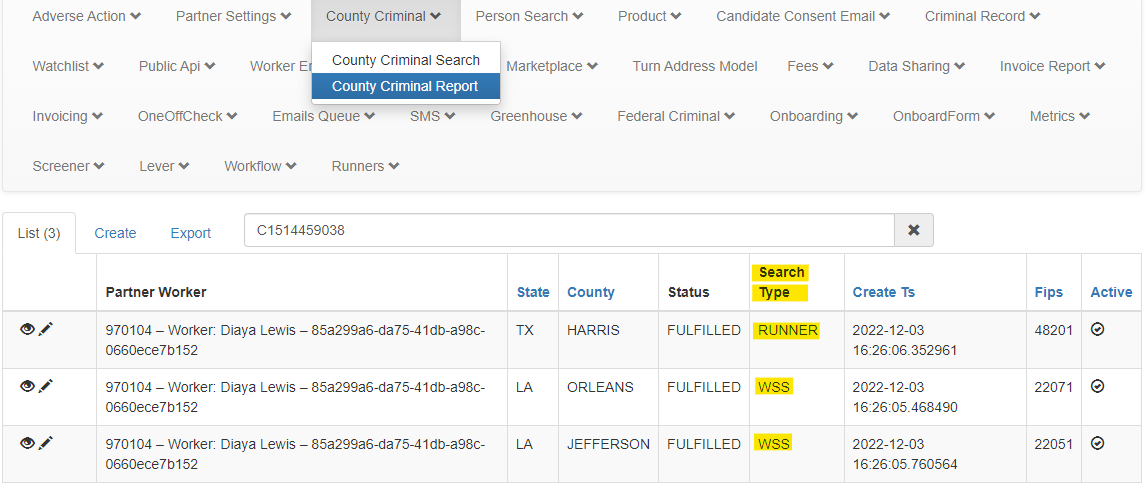
How to confirm if a county check was requested and under what vendor in FLASK:
Go to Flask
Click on County Criminal - County Criminal Report
Search by Turn ID
INFOPOINT
Google sheet: InfoPoint
https://secure.infopoint-research.com/login.cfm
Username: Turntech
Password: Turn2022!
How to Look Up on InfoPoint's page:
Login to InfoPoint’s page
Click on “Look-Up” on the upper right corner
Search by “Subject's First Name” and “Subject's Last Name”
Finally click on “Search”
Infopoint training:
Passcode: Ed^i2mz?
ARMANTEK
Google sheet: Armantek
Prefix for Armantek dockets - https://api.courtdex.com/
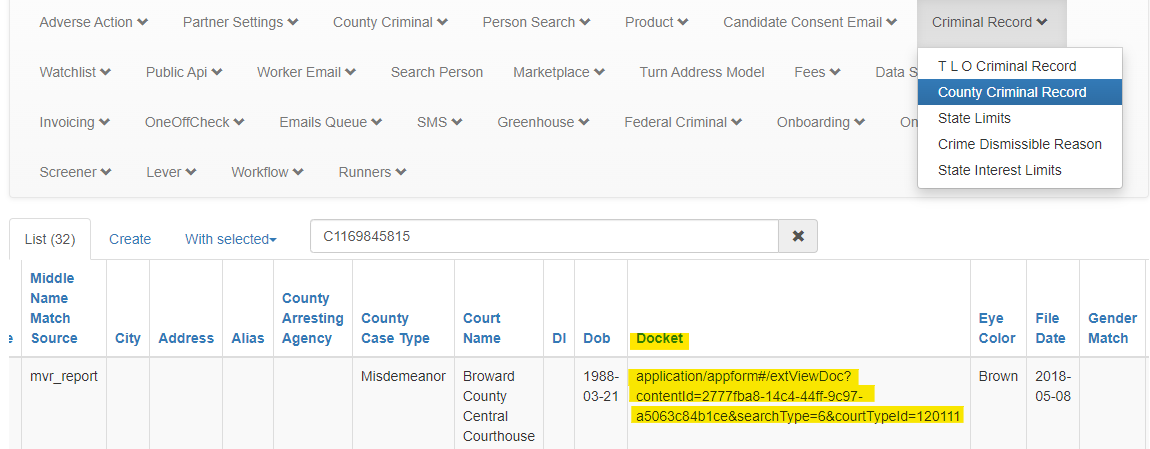
Obtener link para tener acceso a el docket de Armantek:
Go to Flask
Click on Criminal Record
Click on County Criminal Record
Buscar con el Turn ID
Eccontrar el criminal record que queremos consultar
Ir a la columna ”Docket”
Extraer el link
Finalmente armar el link con el prefix + el link extraido de Flask
Pegalo en tu navegador y de manera inmediata te dara acceso al docket
Una vez que tengamos la disposition, vamos a modificar el criminal record desde Flask para mostrar la dispotion en los criminal records de Partner Dashboard.
Ingresar toda la info en el Google sheet for the record
DAILY CHECK PROCEDURES
When to use a Daily Check ticket type:
This Ticket Type should never be used for Disputes
When an agent is following up on information requested to a third party, internal or external.
How to use a Daily Check ticket type:
When information has been requested to a third party the agent must:
Change the ticket type to Daily Check
Close the ticket.
Notate the original ticket type using a private note.
The ticket will automatically reopen every 24 hours for the agent to review:
If the information by the third party has been provided, then resolve the ticket and classify it with the original type (Review, PAA, AA).
If the information has not yet been provided, leave a note with Reviewed and close the ticket.
RECORDS AUDIT LAST NAME TICKETS
Before resolving any Compliance Review ticket, the Compliance Agent will check on Freshdesk if there is a "Records Audit: Last Name" ticket related.
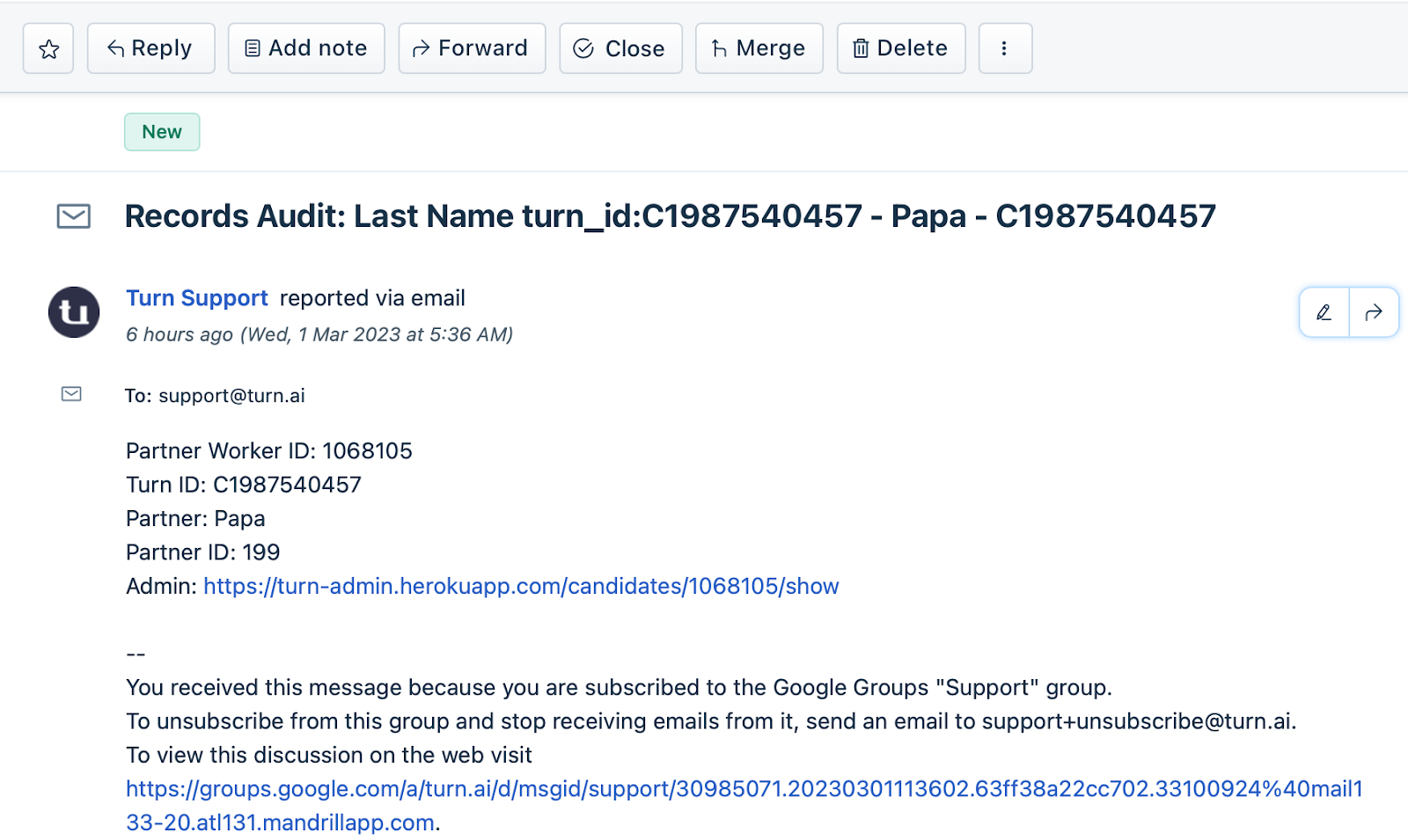
If so, the Compliance Agent will close the ticket using the ticket type "daily check" until Rodolfo and Jimena resolve the "Records Audit: Last Name" ticket.
Once the "Records Audit: Last Name" ticket has been resolved, Rodolfo and Jimena will post it on the complicance_reviews channel, and then Compliance Agent will proceed to adjudicate the background check report.
Keep in mind that this applies for all our partners with “Compliance Review”.
Was this article helpful?
That’s Great!
Thank you for your feedback
Sorry! We couldn't be helpful
Thank you for your feedback
Feedback sent
We appreciate your effort and will try to fix the article